Azure DevOps #
SIS use Azure DevOps for manage projects. We use it like tracking system, system to manage code (source control system), system to manage builds and deploy packages. Please find more information about Azure DevOps there.
Process description #
Before use Azure DevOps we should create project.
Also we should invite project team to the project, setup repository for code, setup build and release pipelines.
Branches strategy #
Depends from project count and name each for branches can be different. We describe typical branched and their goals. How to create new pipeline and main steps
Branch flow:
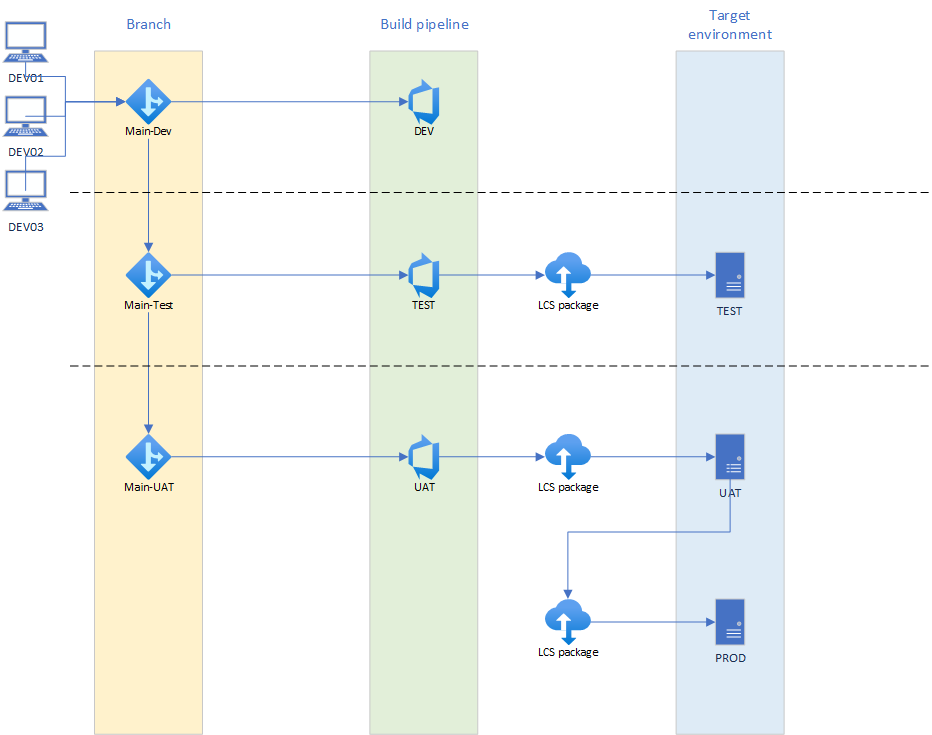
NOTE: Please use good readable pipeline name like
D365FO-Main-DEV (schedule),D365FO-Main-Test (auto),D365FO-Main-UAT (manual)
Please find more information about brach strategies there
Main-Dev #
This branch keep all code from DEV VM’s. It can keep finished modification or modification in progress. Simple version control for all DEV code.
Main build strategy it is to have Build pipeline. This pipe line should have human readable name D365FO-Main-DEV (schedule), and run by schedule or like check-in gateway. Name for branch should be Main-Dev.
Build pipeline steps is:
| Pipeline step | Specifications |
|---|---|
| Prepare for build | Mandatory |
| Set Model Versions | Mandatory |
| Build the solution | Mandatory |
| Database Sync | Mandatory |
| Deploy Reports | Mandatory |
| Create Deployable Package | Mandatory |
| Add Licenses to Deployable Package | Mandatory |
| Generate Release Notes based on Release Comparison API | Optional |
| Publish Artifact: Packages | Mandatory |
| Test Setup | Mandatory |
| Execute Tests | Mandatory |
| Test End | Mandatory |
| Copy Files to: Staging Directory | Mandatory |
| Publish Artifact: AdditionalLogs | Mandatory |
Main-Test #
Main-Test branch keep all code ready to test by consultants. When developer finish work, he assign task for release modification from Main-Dev to Main-Test branch.
Build pipeline steps is:
| Pipeline step | Specifications |
|---|---|
| Prepare for build | Mandatory |
| Set Model Versions | Mandatory |
| Build the solution | Mandatory |
| Database Sync | Optional |
| Deploy Reports | Optional |
| Create Deployable Package | Mandatory |
| Add Licenses to Deployable Package | Mandatory |
| Generate Release Notes based on Release Comparison API | Mandatory |
| Publish Artifact: Packages | Mandatory |
| Test Setup | Mandatory |
| Execute Tests | Mandatory |
| Test End | Mandatory |
| Copy Files to: Staging Directory | Mandatory |
| Publish Artifact: AdditionalLogs | Mandatory |
Continues integration should be setup to YES. Release pipeline run automatically after Build pipeline.
Main-UAT #
Main-Test branch keep all code ready to test by consultants. When developer finish work, he assign task for release modification from Main-Dev to Main-Test branch.
Build pipeline steps is:
| Pipeline step | Specifications |
|---|---|
| Prepare for build | Mandatory |
| Set Model Versions | Mandatory |
| Build the solution | Mandatory |
| Database Sync | Optional |
| Deploy Reports | Optional |
| Create Deployable Package | Mandatory |
| Add Licenses to Deployable Package | Mandatory |
| Generate Release Notes based on Release Comparison API | Mandatory |
| Publish Artifact: Packages | Mandatory |
| Test Setup | Mandatory |
| Execute Tests | Mandatory |
| Test End | Mandatory |
| Copy Files to: Staging Directory | Mandatory |
| Publish Artifact: AdditionalLogs | Mandatory |
Continues integration should be setup to YES. Release pipeline run automatically after Build pipeline.