Restore database from PROD to DEV box #
Main description can be found in the artice LCS DB API: automating Prod to Dev DB copies
We want to build end to end process for all steps. All source code for this action can be cloned from Git repository. Full description of work you can find in node-server\index.html
Prerequisitions #
We should have system user without 2FA with access to LCS, create new Azure AD application with client_id, secretId and grand LCS permission for this application. Access to client managed Build VM, Azure devops. Install:
- d365fo
- Invoke-D365InstallSqlPackage
- Invoke-D365InstallAzCopy
- git
- nodejs
- pm2
- SqlServer powershell module
Install-Module -Name SqlServer
Plan to work #
We should:
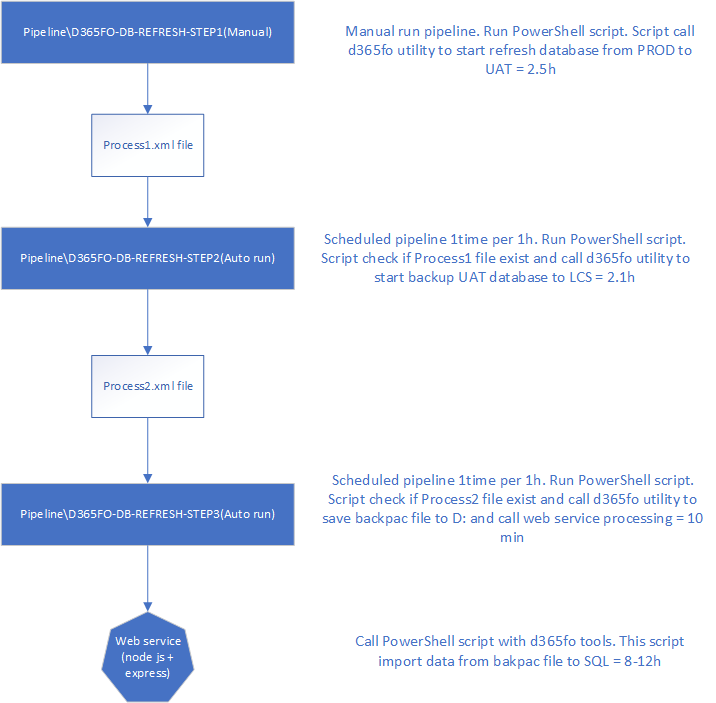
- Refresh Tier2+ env from PROD
- Backup database from Tier2+ env to LCS\Asset library
- Download bacpac file
- Import bacpac file to SQL
Refresh Tier2+ env from PROD (Step1) #
Setup values in file variables.ps1
$clientId = ""
$clientSecret = ""

$userName = ""
$passWord = ""

$projectId = ""

$sourceEnvIdPROD = ""
$targetEnvIdSTAGE = ""

$sqlUser = ""
$sqlPwd = ""

$bacpacName = ""

$Process1 = "c:\temp\Process1.xml"
$Process2 = "c:\temp\Process2.xml"
$Process3 = "c:\temp\Process3.xml"
$defaultLogfile = "C:\Temp\Log\RefreshDatabase.log"
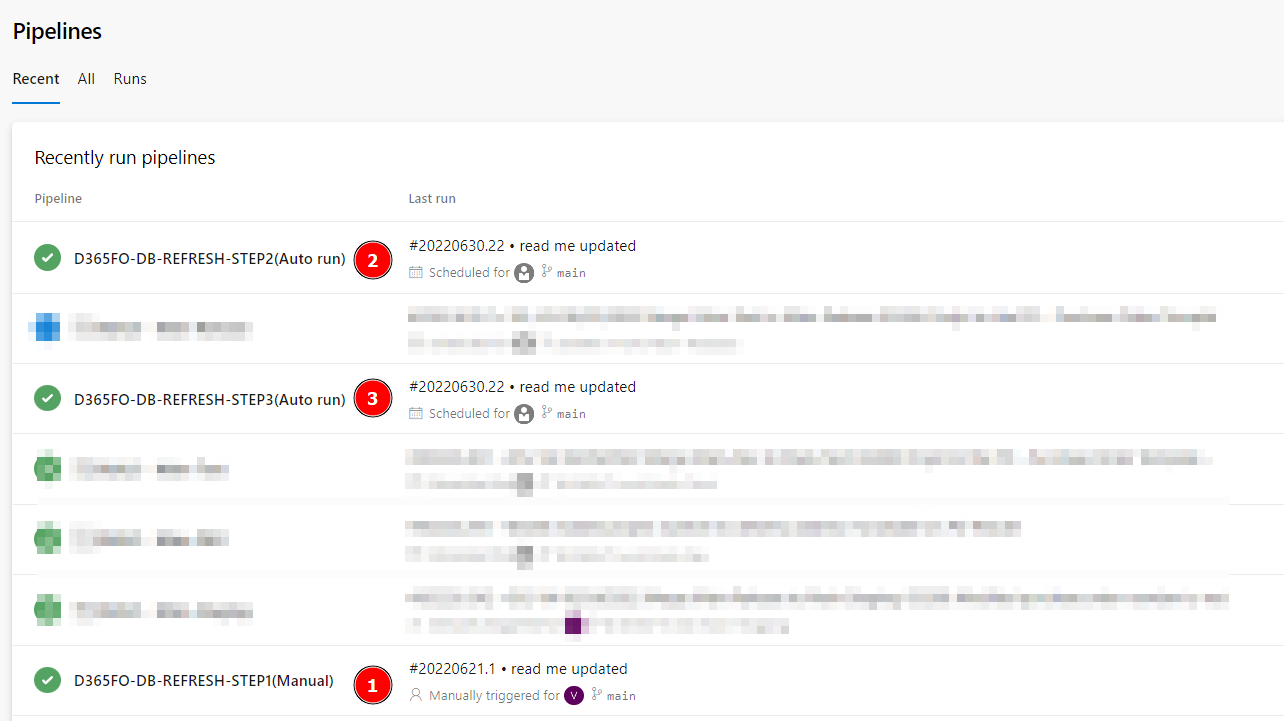
Setup new build pipeline D365FO-DB-REFRESH-STEP1(Manual):
- Default agent pool for YAML =
Default - YAML file path =
pipelines/Step1-PROD-2-STAGING.yml - Select a source =
Azure Repos Git(current solution git repository)
# Starter pipeline
# Start with a minimal pipeline that you can customize to build and deploy your code.
# Add steps that build, run tests, deploy, and more:
# https://aka.ms/yaml

trigger: none

pr: none

pool:
  name: Default

steps:
  - task: PowerShell@2
    inputs:
      filePath: 'Step1-PROD-2-STAGE.ps1'
This step run refresh process and will save process information to the Process1.xml file. Estimate for this step 1-4h
Backup Tier2+ env to LCS\Asset library (Step2) #
Create new pipeline D365FO-DB-REFRESH-STEP2(Auto run). This pipeline will ran one time per 1h. If Process1.xml present and operation completed - it will run Step2-STAGE-BAKPAC-2-LCS.ps1. Pipeline yaml file /pipelines/Step2-STAGING-2-LCS.yml
# Starter pipeline
# Start with a minimal pipeline that you can customize to build and deploy your code.
# Add steps that build, run tests, deploy, and more:
# https://aka.ms/yaml

trigger: none

pr: none

pool:
  name: Default

schedules:
- cron: "0 * * * *"
  displayName: Check if we have a job
  branches:
    include:
    - main
  always: true

steps:
  - task: PowerShell@2
    inputs:
      filePath: 'Step2-STAGE-BAKPAC-2-LCS.ps1'
If previous Process1.xml operation completed - script create Process2.xml file and run export database to the LCS\Asset library.
Download bacpac file (Step3) #
Create new pipeline D365FO-DB-REFRESH-STEP3(Auto run). This pipeline will ran one time per 1h. If Process2.xml present and operation completed - it will run Step3-BAKPAC-2-Localhost.ps1. Pipeline yaml file /pipelines/Step3-BAKPAC-2-SQL.yml
# Starter pipeline
# Start with a minimal pipeline that you can customize to build and deploy your code.
# Add steps that build, run tests, deploy, and more:
# https://aka.ms/yaml

trigger: none

pr: none

pool:
  name: Default

schedules:
- cron: "0 * * * *"
  displayName: Check if we have a job
  branches:
    include:
    - main
  always: true

steps:
  - task: PowerShell@2
    displayName: Run Database import
    continueOnError: true
    inputs:
      filePath: 'Step3-BAKPAC-2-Localhost.ps1'
If previous Process2.xml operation completed - script create download to D: drive bacpac file from LCS\Asset library and run async call http://localhost:5000/import-db-to-sql with parameters for sql server. Why we select approach with nodejs serve - main reason asyncronyous operations. In can run import 8h+.
Nodejs server import (Step4) #
Nodejs server run script Step4-BAKPAC-2-SQL.ps1 in async mode. Script import bacpac database to the regular SQL database.